






AI 社交媒體管家Your AI social media butler

全年無休的
社交媒體管家。
A social media butler that never clocks off.

AI 管家每天為您構思題材、撰寫文案、設計圖片及短片,並逐則審閱;每則貼文都會先送到您的 WhatsApp 群組,您回覆「1」後,信鴿便準時發佈。 Every day, the AI butler plans topics, writes captions, designs images and videos, and reviews each post. It comes to your WhatsApp group first; reply "1" and the pigeon publishes it on time.

  • Facebook
  • Instagram
  • Threads
  • LinkedIn
  • 電子報Email newsletters
  • 其他平台More platforms
  • 無需提供密碼No passwords
  • 未經批准,不會發佈Nothing posts without approval
  • 以日常用語即可修改Change anything in plain words
出報人 × 您的品牌Social Postman × Your brand 您、您的團隊及出報人You, your team and the butler
今天Today
出報人
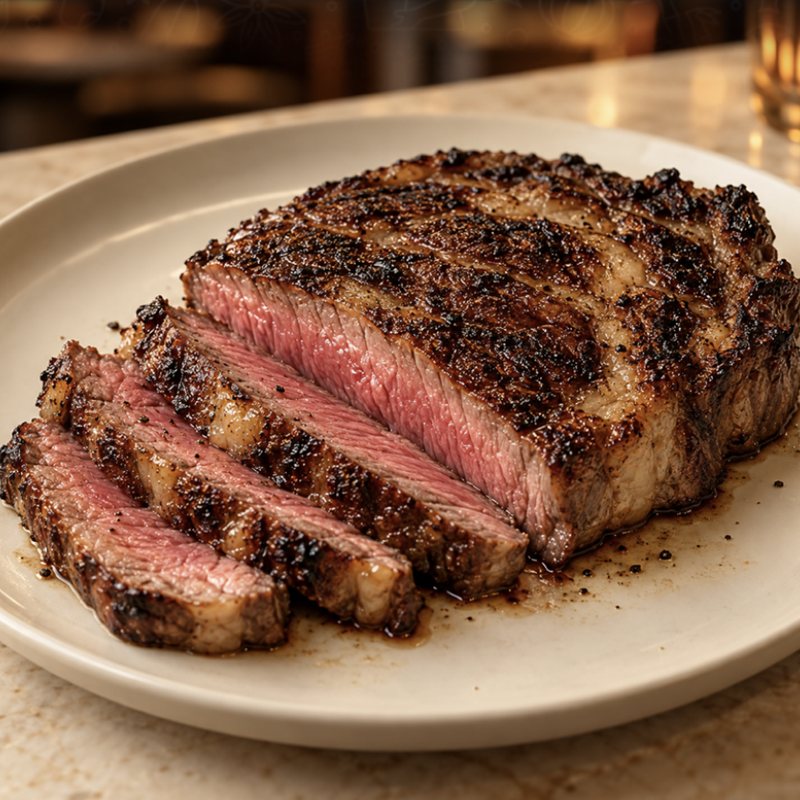
週末想試新餐廳?為您精選三間近三個月開業的炭烤扒房。🍽️ Trying somewhere new this weekend? Three new grill houses worth booking. 🍽️
10:02
點選情境,看看實際對話Tap a scenario to see the chat
按「批准」試試看Try "Approve"

您只需做兩件事You do two things

其餘的工序,無論大小,全部由管家處理。Everything else, big or small, is the butler's job.

您的待辦Your to-do

2
  • 一次Once

    分享管理權限Share access

    在您的社交平台(例如 Facebook 專頁、Instagram、LinkedIn 專頁)將我們加為編輯或管理員。無需提供密碼,您可隨時移除。Add us as an Editor or Admin on your accounts, like your Facebook Page, Instagram or LinkedIn Page. No passwords, and you can remove us any time.

  • 每天Daily

    查看 WhatsApp,回覆「1」Check WhatsApp, reply "1"

    每則貼文的預覽都會傳送到您的專屬群組。回覆「1」即可批准,或直接說明想如何修改。Every post preview arrives in your private group. Reply 1 to approve, or just say what to change.

管家的待辦The butler's to-do

0 / 22
  • 了解品牌、產品及語氣Learn your brand, products and tone
  • 搜集季節及節日題材Find seasonal and festive topics
  • 撰寫文案及行動呼籲Write captions and calls to action
  • 撰寫 LinkedIn 專業文章Write LinkedIn posts
  • 撰寫及發送電子報Write and send email newsletters
  • 策劃 HashtagPick hashtags
  • 製作相片Create photos
  • 設計資訊圖Design infographics
  • 製作五頁輪播圖Build 5-slide carousels
  • 剪輯 30 秒短片Edit 30-second Reels
  • 錄製廣東話旁白Record Cantonese voice-over
  • 加入字幕及品牌標誌Add subtitles and your logo
  • 輪換內容格式Rotate formats
  • 安排發佈時間Schedule every post
  • 傳送預覽及提醒Send previews and reminders
  • 按您的意見修改Revise on request
  • 準時發佈至各個平台Publish on every channel
  • 截圖核查每次發佈Screenshot-check every post
  • 收集平台數據Collect platform insights
  • 撰寫每週報告Write the weekly report
  • 每日檢查系統Run daily system checks
  • 處理專頁設定等雜務Handle page setup and admin

服務流程How it works

六個步驟,您只需負責第三步。Six steps. Only step three is yours.

  1. 了解您的品牌We learn your brand

    標誌、品牌色、語氣、產品及想傳達的訊息,每則貼文都依此製作。Logo, colours, tone, products and key messages. Every post follows them.

  2. 提前製作Made days ahead

    管家撰寫文案、Hashtag,並製作圖像或短片,在發佈日數天前已準備好。The butler writes the caption and hashtags and makes the visual, days before the posting date.

  3. 在 WhatsApp 批准You approve on WhatsApp

    預覽傳送至您的群組,回覆「1」即可批准。The preview arrives in your group. Reply 1 to approve.

  4. 準時發佈Published on time

    信鴿於排定時間發佈至 Facebook、Instagram、Threads、LinkedIn,或以電子報發送。The pigeon publishes at the scheduled time on Facebook, Instagram, Threads, LinkedIn, or as a newsletter.

  5. 連結及截圖Links and screenshots

    發佈後即傳送連結;每次發佈均截圖核查,如有異常,團隊即時跟進。You get the live links. Every post is screenshot-checked, and any failure alerts our team.

  6. 每週報告Weekly report

    星期日早上送上 PDF 報告,附數據圖表及下週建議(方案二及方案三)。A PDF every Sunday morning, with charts and advice for next week (Plus and Custom).

四種內容格式,每天輪換Four formats, rotated daily

例如相片、資訊圖、短片、輪播圖,次序由您決定;LinkedIn 文章及電子報亦可一併製作。每則內容都使用您的品牌色及標誌。For example photo, infographic, video, carousel, in the order you choose. LinkedIn posts and newsletters too. Everything uses your brand colours and logo.

相片貼文Photo post

一張吸睛相片,配合文案及 Hashtag。One eye-catching image with caption and hashtags.

實際案例:頭啖 First BiteReal post: First Bite

資訊圖Infographic

重點一目了然,中文字準確清晰。Key points at a glance, with accurate Chinese text.

0:30

短片(Reels)Short video (Reel)

30 秒直向短片,附廣東話旁白及字幕。30 seconds, vertical, with Cantonese voice-over and subtitles.

實際案例:MISOUP 湯Real post: MISOUP

管家的一天A day with the butler

以下為示例時間表。您專心經營生意,您的專頁由管家全天候照顧。A sample day. You run your business; the butler looks after your pages around the clock.

  1. 03:00

    系統健康檢查System health check

    您在休息,管家在巡邏。You sleep. The butler does the rounds.

  2. 08:00

    製作未來數天的貼文Make the next few days' posts

    文案、圖像及短片同步準備。Captions, images and videos, all in progress.

  3. 10:00

    傳送預覽至 WhatsApp 群組Send previews to your WhatsApp group

    每則預覽附圖像或短片、文案及發佈時間。Each one shows the visual, the caption and the posting time.

  4. 11:30

    提醒等待批准的貼文Remind you about pending posts

    若開啟自動發佈,會在發佈前一小時提醒您。With auto-publish on, you get a reminder one hour before.

  5. 12:30

    準時發佈Publish on time

    發佈至已連接的社交平台或發送電子報,並把連結傳送到群組。Live on your connected channels or sent as a newsletter, with links in your group.

  6. 12:35

    截圖核查Screenshot check

    確認貼文正常顯示;如有異常,團隊即時跟進。We confirm the post looks right. If not, our team steps in.

  7. 18:00

    收集數據Collect the numbers

    直接從各平台洞察報告讀取真實數字。Real numbers, read straight from each platform's insights.

  8. 09:00星期日Sunday

    送上每週報告Deliver the weekly report

    2 至 3 頁 PDF 週報,傳送至您的群組。A 2–3 page PDF report, sent to your group.

每個星期日早上,報告準時送到Every Sunday morning, your report arrives

2 至 3 頁 PDF 報告,總結過去 7 天的表現,並附上可以即時執行的建議。A 2–3 page PDF covering the last 7 days, with advice you can act on right away.

方案二及方案三包括Included in Plus and Custom

  • 主要數字及與上週比較Headline numbers vs last week
  • 各平台數據及每日觀看走勢Each platform, plus daily views
  • 本週最佳貼文及貼文一覽Top posts and everything posted
  • 繁體中文分析及下週建議Analysis in Traditional Chinese, with next week's plan

只用真實數據。平台未有提供的數字一律以「—」標示,絕不估算。Real numbers only. Anything a platform doesn't report is shown as "—", never guessed.

每週成效報告Weekly performance report

您的品牌 第 43 週 10 月 19 日至 25 日Your brand, week 43, 19–25 October

樣本數據Sample data
觀看Views18,240▲ 12%
觸及Reach9,615▲ 8%
互動Interactions742▲ 21%
新追蹤者New followers64▲ 5
貼文Posts7持平Same

每日觀看Daily views

各平台觀看Views by platform

Instagram8,960
Facebook7,820
Threads1,460

Threads 觸及人數:—(平台未提供)Threads reach: — (not reported by the platform)

下週建議:星期五及星期六的觀看最高,建議把優惠貼文安排在星期五中午發佈,並以短片形式呈現。Next week: Friday and Saturday got the most views. Schedule your offer for Friday lunchtime, as a short video.

管家的承諾The butler's promises

  • 未經批准,不會發佈Nothing goes live without approval

    除非您主動開啟自動發佈;即使開啟,發佈前一小時亦會提醒您。Unless you turn on auto-publish, and even then you get a reminder an hour before.

  • 無需提供密碼No passwords

    只需分享編輯或管理員權限,您可隨時收回。Just share an Editor or Admin role. Take it back any time.

  • 修改只需數分鐘Changes in minutes

    以日常用語說明,例如「簡短一點」或「改為下午 6 時發佈」,數分鐘內便有新版本。Say it in plain words, like "make it shorter" or "post at 6pm", and get a new version in minutes.

  • 為香港品牌而設Made for Hong Kong brands

    廣東話、繁體中文或英文文案,廣東話旁白,繁體中文週報。Cantonese, Traditional Chinese or English captions, Cantonese voice-overs, and reports in Traditional Chinese.

收費Pricing

按月收費,內容按星期計算。每個方案都包括製作、WhatsApp 批准及準時發佈,可先免費試做一則貼文。Priced monthly, with content counted per week. Each plan covers creating, WhatsApp approval and on-time publishing. Start with a free sample post.

方案一Plan 1

起步Starter

HK$550/月/ month

每星期 5 則貼文:5 posts every week:

  • 1 則 AI 生成短片1 AI-generated video
  • 1 則資訊圖動畫短片1 animated infographic video
  • 3 則圖片或文字貼文3 image or text posts
  • 標準 AI 配音Standard AI voice-over
  • 修改:每則短片 2 次,每則圖片或文字貼文 5 次Revisions: 2 per video, 5 per image or text post

免費試做一則貼文Get a free sample post
方案二Plan 2 包括每週報告Weekly report included

進階Plus

HK$800/月/ month

每星期 5 則貼文:5 posts every week:

  • 2 則 AI 生成短片2 AI-generated videos
  • 2 則資訊圖動畫短片2 animated infographic videos
  • 1 則圖片或文字貼文1 image or text post
  • 自訂 AI 配音聲線Custom AI voice
  • 每週成效報告Weekly performance report
  • 修改:每則短片 2 次,每則圖片或文字貼文 5 次Revisions: 2 per video, 5 per image or text post

免費試做一則貼文Get a free sample post
方案三Plan 3

自訂Custom

HK$1,500起/月+ / month

或按您的需要報價:Or a quote for your needs:

  • 自訂工作流程A custom workflow
  • 平台、發佈次數及內容組合按您的業務設計Platforms, posting frequency and content mix designed around your business
查詢自訂方案Ask about Custom

所有方案均包括專屬 WhatsApp 群組批准、準時發佈至您選擇的平台,以及每次發佈截圖核查。Every plan includes your own WhatsApp approval group, on-time publishing to the platforms you choose, and a screenshot check of every post.

常見問題Questions

需要安裝任何程式嗎?Do I need to install anything?

不需要。一切在 WhatsApp 群組內完成,您亦可使用網頁連結。No. Everything happens in a WhatsApp group, plus a web link if you prefer.

支援哪些平台?Which platforms do you support?

Facebook、Instagram、Threads 及 LinkedIn,亦可製作及發送電子報與推廣電郵。其他平台可按您的需要設定,歡迎查詢。Facebook, Instagram, Threads and LinkedIn, plus email newsletters and promotional emails. Other platforms can be set up on request. Just ask.

需要提供帳戶密碼嗎?Do I need to give you my passwords?

不需要。請在 Facebook 專頁、Instagram 及 LinkedIn 專頁將我們加為編輯或管理員,並在電郵平台新增我們為團隊成員。Threads 只需由您登入授權一次,同樣無需提供密碼。No. Add us as an Editor or Admin on your Facebook Page, Instagram and LinkedIn Page, and as a team member on your email platform. For Threads, you approve our access once by logging in yourself. Still no password.

會否未經我批准便發佈?Will anything be posted without my approval?

不會,除非您開啟自動發佈;即使開啟,發佈前一小時亦會提醒您。No, unless you turn on auto-publish. Even then, you get a reminder one hour before.

看過預覽後可以修改嗎?Can I change a post after seeing it?

可以。回覆「2」修改文字、「3」更換圖片或重新製作短片,或直接以文字說明想如何修改。每則短片包括 2 次修改,每則圖片或文字貼文包括 5 次修改。Yes. Reply 2 to change the text or 3 for a new image or video, or just describe the change. Each video includes 2 revisions, and each image or text post includes 5.

不使用 WhatsApp 可以嗎?What if I don't use WhatsApp?

可以。您亦可透過網頁連結、電郵或 Instagram 私訊批准貼文。That's fine. You can also approve from a web link, by email or by Instagram DM.

我需要提供甚麼資料?What do I need to provide?

品牌標誌、品牌顏色、業務及產品簡介,以及上述帳戶權限。Your logo, brand colours, a short description of your business and products, and the account access above.

貼文使用甚麼語言?What language are the posts in?

廣東話、繁體中文或英文,由您選擇。每週報告以繁體中文撰寫。Cantonese, Traditional Chinese or English, whichever you choose. Weekly reports are in Traditional Chinese.

每星期發佈多少則貼文?How many posts per week?

方案一及方案二每星期發佈 5 天,時段由您決定,例如中午 12:30;方案三可按需要設定。Starter and Plus post 5 days a week at a time you choose, for example 12:30. Custom can be set to your needs.

貼文由誰製作?Who makes the posts?

貼文由我們的 AI 系統製作。系統每日進行檢查,遇到需要人手處理的情況(例如登入或發佈失敗),團隊會即時跟進。每則貼文均須經您批准方會發佈。Our AI system makes them. It runs daily checks, and our team steps in whenever a person is needed, such as a login or a failed post. Every post still needs your approval.

明天的貼文,
今天就可以開始準備。
Tomorrow's post can start today.

透過 WhatsApp 傳送您的網站連結或產品資料,管家會免費製作一則示範貼文,並發佈到我們的示範帳戶,讓您親身體驗整個流程。WhatsApp us your website or product details. The butler will make a free demo post and publish it on our demo account, so you can see the whole flow first-hand.